RAG pipeline video transcript example that works
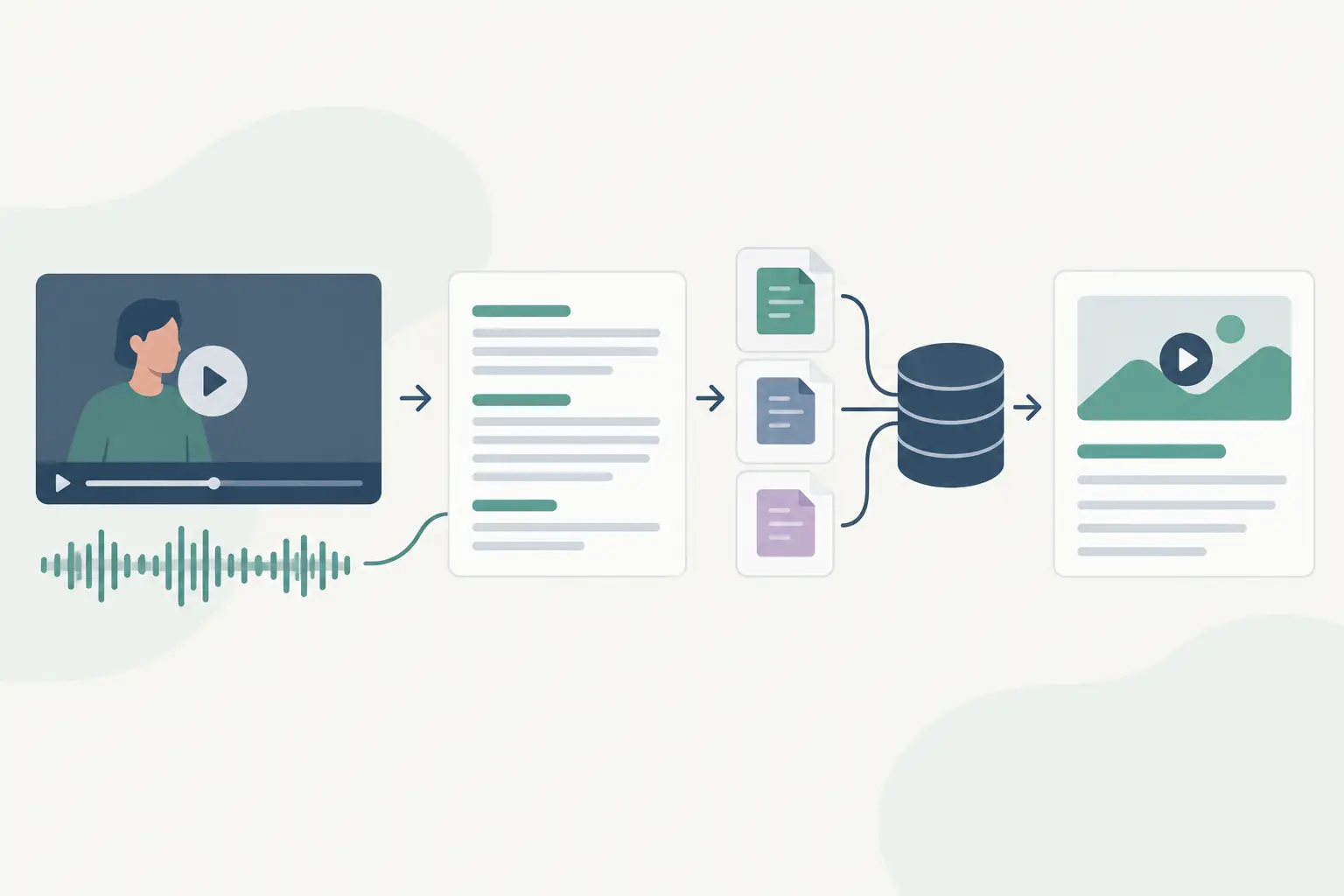
A competitor posts 40 product demos a month. Your team can watch them, or you can turn each public video into a searchable knowledge base that answers questions like: “Which objections come up most often?” A RAG pipeline video transcript example makes the second option concrete, including the parts that usually break: weak chunks, missing timestamps, and retrieval that returns adjacent but useless speech.
TL;DR
A video RAG pipeline works when each transcript chunk keeps enough surrounding context and a source timestamp. Start with paragraph-like chunks, embed them, retrieve a small set for each question, then make the model answer only from those chunks. Test retrieval before you spend time tuning prompts.
What this pipeline needs to do
RAG stands for retrieval-augmented generation. Instead of asking a model to answer from its general training data, you first retrieve relevant passages from your transcript collection and include those passages in the prompt.
For social video, the transcript itself is only part of the record. Each chunk should also carry the original video URL or ID, platform, publication date if you have it, language, and start and end timestamps. The answer becomes useful when a teammate can jump back to the right moment and check the source.
A minimal flow looks like this:
- Submit public video URLs for transcription.
- Store the returned text with video-level metadata.
- Split the transcript into overlapping chunks.
- Generate embeddings for those chunks and save the vectors plus metadata.
- Embed a user question, retrieve the closest chunks, and pass them to a chat model.
- Return an answer with video titles and timestamps.
You can transcribe public TikTok, YouTube, Instagram, and Facebook URLs with ReelScribe, then pass the resulting text into the indexing step. The useful boundary is simple: transcription produces the source text; your RAG service owns chunking, storage, retrieval, and answers.
The transcript structure decides retrieval quality
Video speech does not arrive in neat documentation sections. A creator may set up a point for 20 seconds, answer it in one sentence, then change topics without a pause. Splitting every 500 characters often cuts the question from the answer.
Use timestamped segments when your transcription output includes them. Combine adjacent segments until each chunk contains one complete idea, then add a small overlap to the next chunk.
| Chunking method | Best use | Main risk | Good starting point |
|---|---|---|---|
| Fixed character length | Quick prototype with plain text | Cuts sentences and topic changes | 1,200 characters with 200 overlap |
| Fixed token length | Mixed transcript formats | Still ignores semantic boundaries | 250 to 400 tokens with 50 overlap |
| Timestamped semantic chunks | Product demos, interviews, recurring video research | Needs segment timestamps and a little more logic | One topic per chunk, usually 30 to 90 seconds |
The third option is usually worth it for social clips. A 30-second Reel may need only one chunk, while a 20-minute interview needs many. Chunk size depends on how people will query the collection. Questions about exact claims need tighter chunks than broad questions about recurring themes.
Keep the metadata attached to every chunk rather than only to the parent transcript. A vector database retrieves chunks, not the original file. If the chunk has no timestamp, your answer layer has nothing reliable to cite.
Turn a ReelScribe export into timestamped chunks
You don't have to build the segment list by hand. Select the transcripts in your ReelScribe dashboard and export them as Files (ZIP). The archive has one transcription-<id>.json file per video, holding the id, the source url, the full transcription, a segments array of {start, end, text} objects with times in seconds, and a metadata object. From the metadata, carry videoTitle (YouTube only), ownerUsername, detected_language and timestamp, which is the original post date where the platform gives one. The REST API and the n8n node return the same segments array, with title, owner and videoTimestamp at the top level instead.
Two details decide whether you can cite those timestamps. First, if a record has no stored segments, the export spreads the transcript's sentences evenly across the video's length, so the times are estimates. That mostly happens on very long videos, where ReelScribe merges segments into coarser ones or drops them to stay under its storage limit. Second, keep metadata.caption out of the spoken text, or label it. It is the poster's caption (on YouTube, the video description), not something anyone said in the video.
This script merges adjacent segments into chunks of about 180 words, repeats one segment as overlap, and keeps the first start time and last end time of every chunk. It writes the same fields the retrieval example below reads.
# chunk_reelscribe.py
# Usage: python chunk_reelscribe.py transcription-<id>.json > chunks.json
import json
import sys

MAX_WORDS = 180  # rough size per chunk; swap in your embedding model's tokenizer later
OVERLAP = 1      # segments repeated at the start of the next chunk

with open(sys.argv[1], encoding="utf-8") as file:
    record = json.load(file)

meta = record.get("metadata") or {}
segments = [s for s in record.get("segments") or [] if s.get("text", "").strip()]


def make_chunk(group, index):
    return {
        "id": f"{record['id']}:{index:03d}",
        "text": " ".join(s["text"].strip() for s in group),
        "video_title": meta.get("videoTitle") or "",
        "video_url": record["url"],
        "account": meta.get("ownerUsername") or meta.get("owner") or "",
        "language": meta.get("detected_language") or "",
        "posted_at": meta.get("timestamp") or "",
        "start_seconds": group[0]["start"],
        "end_seconds": group[-1]["end"],
    }


chunks, current, words = [], [], 0
for segment in segments:
    count = len(segment["text"].split())
    if current and words + count > MAX_WORDS:
        chunks.append(make_chunk(current, len(chunks)))
        current = current[-OVERLAP:]
        words = sum(len(s["text"].split()) for s in current)
    current.append(segment)
    words += count

if current:
    chunks.append(make_chunk(current, len(chunks)))

json.dump(chunks, sys.stdout, ensure_ascii=False, indent=2)
Word counts are a stand-in. Once retrieval works, switch to your embedding model's tokenizer and move boundaries to topic changes where your test questions show a chunk cutting a question off from its answer.
Sending YouTube videos through the same pipeline
YouTube works differently from the other platforms. ReelScribe doesn't run speech recognition on YouTube audio. It reads the captions the video already has, either the creator's own or YouTube's automatic ones, so each segment is roughly one caption line and the merge step above matters even more. A video without captions fails, and its credit is refunded.
The metadata is different too. The title is in videoTitle, the channel handle in ownerUsername and the channel name in ownerFullName, and the video description lands in caption. YouTube records have no post date, so add one yourself if your filters need it. The language field comes from the video's caption track list rather than from the audio, so treat it as a hint.
A working RAG pipeline video transcript example
This local example uses Ollama for embeddings and generation, plus an in-memory vector search so you can see the data flow without choosing a database first. Run Ollama locally and pull nomic-embed-text plus llama3.2 before running it.
The script indexes three timestamped chunks from one product video. In production, replace the chunks array with json.load(open("chunks.json")) from the script above (add import json), and persist the embeddings in Qdrant, pgvector, Chroma, or your existing search stack.
# rag_video_transcript.py
# pip install requests
import math
import requests

OLLAMA = "http://localhost:11434"
EMBED_MODEL = "nomic-embed-text"
CHAT_MODEL = "llama3.2"

chunks = [
    {
        "text": "You can batch public video URLs instead of pasting one URL at a time. The job returns text for each submitted video.",
        "video_title": "Weekly workflow walkthrough",
        "video_url": "https://example.com/video-123",
        "start_seconds": 42,
        "end_seconds": 58,
        "language": "en",
    },
    {
        "text": "For competitor research, tag each transcript with the brand, platform, posting date, and campaign. Those fields let you filter retrieval later.",
        "video_title": "Weekly workflow walkthrough",
        "video_url": "https://example.com/video-123",
        "start_seconds": 59,
        "end_seconds": 77,
        "language": "en",
    },
    {
        "text": "Use timestamps in the final answer. A summary without a source moment makes it harder for a teammate to verify the claim in the original video.",
        "video_title": "Weekly workflow walkthrough",
        "video_url": "https://example.com/video-123",
        "start_seconds": 78,
        "end_seconds": 94,
        "language": "en",
    },
]


def embed(texts):
    response = requests.post(
        f"{OLLAMA}/api/embed",
        json={"model": EMBED_MODEL, "input": texts},
        timeout=60,
    )
    response.raise_for_status()
    return response.json()["embeddings"]


def cosine(a, b):
    dot = sum(x * y for x, y in zip(a, b))
    length_a = math.sqrt(sum(x * x for x in a))
    length_b = math.sqrt(sum(y * y for y in b))
    return dot / (length_a * length_b)


for chunk, vector in zip(chunks, embed([c["text"] for c in chunks])):
    chunk["vector"] = vector

question = "How should I make competitor videos easier to search later?"
question_vector = embed([question])[0]

results = sorted(
    chunks,
    key=lambda chunk: cosine(question_vector, chunk["vector"]),
    reverse=True,
)[:2]

context = "\n\n".join(
    f"Source: {item['video_title']} ({item['start_seconds']}s-{item['end_seconds']}s)\n"
    f"Transcript: {item['text']}"
    for item in results
)

prompt = f"""Answer using only the sources below. If the sources do not answer the question, say so.
Cite each factual statement with the source timestamp in parentheses.

Question: {question}

Sources:
{context}
"""

response = requests.post(
    f"{OLLAMA}/api/generate",
    json={"model": CHAT_MODEL, "prompt": prompt, "stream": False},
    timeout=120,
)
response.raise_for_status()
print(response.json()["response"])
The script has one deliberate limitation: it searches every chunk in memory. That is fine for a test set. Once you have hundreds or thousands of videos, move vectors into a database that supports similarity search and metadata filters.
Filter before you retrieve when the question has scope
A similarity score alone can pull a relevant sentence from the wrong brand, campaign, or language. If someone asks, “What did Brand A say about shipping this quarter?” search only chunks where brand=Brand A and the publication date falls in your target period.
This is where video metadata pays for itself. Add fields during ingestion while the source is known, rather than asking a model to infer them later from spoken text. For multilingual collections, store the transcript language too. You can embed each language as written, or translate before indexing if your retrieval and answer model work better in one language. Test both with the questions your team actually asks.
Use a hybrid search strategy when exact names matter. Vector search catches related language, while keyword search catches product names, discount codes, model numbers, and unusual campaign phrases. The best mix depends on the corpus. A library of loosely structured creator videos benefits from semantic retrieval; technical demos often need both.
Check retrieval before prompt tuning
When answers look wrong, inspect the retrieved chunks first. Prompt changes cannot fix a pipeline that retrieved a greeting, a sponsor read, and an unrelated closing remark.
Create a small evaluation file with real questions, expected video IDs, and expected timestamps. For each question, record whether one of the top five results contains enough evidence to answer. That gives you a retrieval baseline before you change chunk length, embedding models, or your top-k setting.
You should also handle three common failure cases:
- Very short clips may be one chunk, which makes retrieval easy but can produce broad answers. Keep the full clip timestamp range.
- Repeated intros and calls to action can dominate results across a large account. Remove them during cleanup or mark them with a low retrieval priority.
- Auto-generated transcript punctuation can join unrelated phrases. If timestamps exist, prefer time boundaries over punctuation alone.
Do not send ten loosely related chunks to the generation model by default. More context can dilute the evidence and raise latency. Start with three to five retrieved chunks, then increase that only when evaluation results show that answers lack needed context.
Put it into an automation without losing traceability
In n8n, keep the workflow split into an ingestion path and a question path. The ingestion path triggers on new public video URLs, waits for transcription output, chunks text, creates embeddings, and writes vectors plus metadata. The question path receives a query, applies filters, retrieves chunks, calls the model, and returns citations.
Pass a stable video ID through every node. URLs can gain tracking parameters, titles can change, and two videos can share similar captions. Your chunk records should use the stable ID as the join key, with the original URL stored as a display field.
Build chunk IDs from that stable ID plus a chunk number, as the script above does. When you re-chunk a video, delete every chunk with its video ID before you write the new set. An upsert alone leaves old chunks behind whenever the new rules produce fewer of them.
Start with ten videos from one use case, such as competitor product demos or your own support clips. Write ten questions your team would ask, inspect the retrieved timestamps, and adjust chunk boundaries before you automate the next hundred URLs.
Ready to turn your videos into text?
Start with 25 free credits. No credit card required. Works with TikTok, YouTube, Instagram, Facebook, Threads, LinkedIn, X and Bluesky.
Also see: Best AI Tool for Video Transcription (2026 Comparison) · YouTube Video Summarizer: 5 Ways to Get a Summary · How to Transcribe a YouTube Video: 4 Ways (2026) · How to Build a YouTube Transcript Webhook